Every budgeting method does the same basic job: it shows what's coming in, what's going out, and whether your plan matches reality. The difference is how much work each one asks of you, and how much it does for you. There's no single right answer, only the one that fits how you like to work.
The quick answer
- Choose a spreadsheet if you enjoy tinkering, want full control over categories and formulas, and don't mind opening a file and typing in numbers every week.
- Choose an app if you want the math done for you, like checking your budget on your phone in a few seconds, and want your plan to carry forward month to month without copying tabs.
- Choose paper if writing things down helps you remember them, you like a visual page on the fridge, or screens make you tune out.
Plenty of people mix them, like an app for day-to-day tracking and a printable page for a savings challenge.
Side by side
| Spreadsheet | App | Paper | |
|---|---|---|---|
| Cost | Free to low | Free to a few dollars a month | Low |
| Setup | Build or buy a template | A few minutes | Print and go |
| Weekly effort | Medium | Low | Medium |
| Flexibility | Very high | Medium | High |
| On your phone | Possible but fiddly | Built for it | No |
| Math errors | Possible if a formula breaks | Handled for you | Up to you |
Budgeting with a spreadsheet
What's good
- Total control. You choose every category, every formula and every chart.
- Cheap. Free spreadsheet programs are available on most computers and online.
- You learn a lot. Building your own budget teaches you exactly how your money moves.
What's hard
- Formulas break. One accidental overwrite and your totals are wrong without warning.
- New month, new tab. Copying last month and clearing the numbers is easy to put off.
- Phones are awkward. Logging a purchase in a spreadsheet at the checkout isn't much fun, so many people fall behind and try to catch up on Sunday night.
How to make a simple budget spreadsheet (10 minutes)
If you want to try the spreadsheet route, this layout is enough for most people:
- Column A: Category. Start with 10 to 15: rent or mortgage, utilities, phone, insurance, car payment, gas, groceries, eating out, household, personal, fun money, debt payments, savings, and a line for irregular costs.
- Column B: Planned. What you plan to spend this month in each category. Our budget calculator gives you a starting split.
- Column C: Actual. What you really spent. Update it once or twice a week from your bank app.
- Column D: Difference. Planned minus actual. A negative number means you've gone over.
- At the top: your take-home pay, total planned, and "left to plan" (take-home minus total planned). Aim for zero, like a zero-based budget.
Add simple sum formulas for the total rows, and color the Difference column red when it goes below zero. That's it. Resist the urge to build ten tabs on day one. A simple sheet you update beats a beautiful one you abandon.
Prefer not to build it yourself? Our free budget calculator handles the first month, and there are ready-made templates in our shop that fill in each month automatically.
Budgeting with an app
What's good
- The math is done for you. Totals, "left to spend" and progress bars update the moment you log something.
- It's always with you. Logging a purchase takes a few seconds, so tracking actually happens.
- Plans carry forward. Your categories and goals roll into next month without rebuilding anything.
- Debt and savings in one place. Good apps show your debt payoff date and savings goals next to your budget.
What to watch for
- Cost. Some apps are free with ads, some charge a monthly or yearly fee. Check what you'll pay after any trial.
- Bank connections. Some apps connect to your bank to pull transactions. That's convenient, but some people prefer not to share bank logins, and automatic imports can make it easy to stop paying attention. Apps where you enter purchases yourself keep you more aware of each one.
- Too many features. An app packed with charts and settings can be as overwhelming as a complicated spreadsheet. Simpler is usually better.
Budgeting on paper
Paper is underrated. Writing down a purchase makes you notice it, and a printed monthly page or a savings challenge chart on the fridge is a daily reminder of your goal. It's also great for couples who want to sit down together once a week. The downside is that you do all the math, and it's harder to check your budget while you're out.
A printable 52-week savings chart or a cash envelope setup are good places to start if you like pen and paper.
How to choose: five questions
- Did you stop your last budget because it was too much work? Lean toward an app.
- Do you love customizing things? Lean toward a spreadsheet.
- Do you remember things better when you write them? Lean toward paper.
- Do you want to check your budget in the store? An app is easiest.
- Are you budgeting with a partner? Pick something you can both see: a shared app or a page you sit down with together.
Not sure what kind of money person you are? Our 2-minute money style quiz gives a quick read on your habits and a matching three-step plan.
About our Planner app
We built the Steady Sums Planner for people who like the idea of a spreadsheet but never keep it up. It covers a monthly budget with planned vs. actual, a spending log, a debt payoff plan (snowball or avalanche) and savings goals, on your phone or computer. You enter your own numbers, so there's no bank connection, and there are no ads. It's free for 14 days with no card needed, then $5 a month or $48 a year. If a spreadsheet or paper suits you better, that's a great choice too. The best system is the one you use.
Whatever you pick, do this
- Update it at least once a week, same day each week.
- Do a 15-minute review at the end of each month.
- Keep categories simple until the habit sticks.
- Give it three months before switching tools. Most budgets feel awkward in month one.
What's your money style?
8 everyday money moments reveal your style, your blind spot and a 3-step plan. Compare with a partner.
Take the quiz →Try the numbers yourself
Our free budget calculator works it out in seconds. No sign-up.
Open the calculator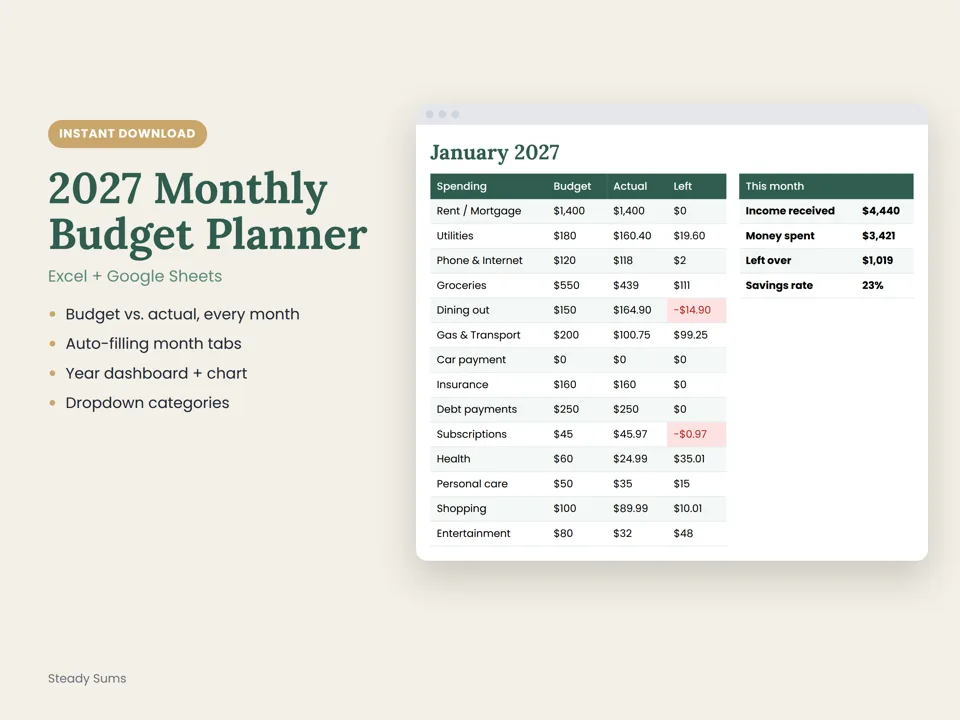
Want this done for you every month?
Our budget spreadsheet fills in each month automatically and shows budget vs. actual at a glance.
Want the app route? Try the Planner free for 14 days.
Budget, debt payoff and savings goals in one calm app, on your phone or computer. Free for 14 days, then $5/month. No card needed to start.
Try the Planner freeQuestions people ask
Is it better to budget with a spreadsheet or an app?
It depends on you. Spreadsheets give full control and cost little but take more upkeep. Apps do the math and are easy to use on your phone but may cost a monthly fee. Choose the one you'll keep using every week.
How do I make a simple budget spreadsheet?
Create four columns: category, planned, actual and difference. List 10 to 15 categories, add your take-home pay at the top, and use sum formulas for totals. Update actual spending once or twice a week.
Are budget apps safe?
Look for apps that explain how your data is stored and who can see it. If you'd rather not share bank logins, choose an app where you enter numbers yourself instead of connecting accounts.
Is paper budgeting still worth it?
Yes, for many people. Writing purchases down helps you notice them, and a printed page is easy to review with a partner. The trade-off is doing the math yourself.
How much does the Steady Sums Planner cost?
It's free for 14 days with no card needed to start, then $5 a month or $48 a year. You can cancel any time.
Save this guide for later.
Pin it to your budgeting board so it's there when you need it.
Steady Sums shares general education, not financial advice. For decisions about your situation, talk to a licensed professional.
More money guides
How to start budgeting (a simple beginner guide)
You don't need a perfect spreadsheet. You need five steps and about an hour.
Read the guide →How a zero-based budget works (and how to start one)
Give every dollar a job before the month starts. It sounds strict, but it's one of the simplest ways to stop wondering where your money went.
Read the guide →The new year budget reset: 7 steps for a calmer January
January is the easiest month to change your money habits. Here's a simple reset you can finish in one weekend, with an optional no-spend challenge to kick it off.
Read the guide →One calm money move a week.
A 3-minute Tuesday email with one simple step for budgeting, saving and paying off debt. Join free and get a printable $1,000 emergency fund tracker.